name: inverse layout: true class: center, middle, inverse <div class="my-header"><span> <a href="/training-material/topics/dev" title="Return to topic page" ><i class="fa fa-level-up" aria-hidden="true"></i></a> <a href="https://github.com/galaxyproject/training-material/edit/main/topics/dev/tutorials/architecture-plugins/slides.html"><i class="fa fa-pencil" aria-hidden="true"></i></a> </span></div> <div class="my-footer"><span> <img src="/training-material/assets/images/GTN-60px.png" alt="Galaxy Training Network" style="height: 40px;"/> </span></div> --- <img src="/training-material/assets/images/GTNLogo1000.png" alt="Galaxy Training Network" class="cover-logo"/> <br/> <br/> # Architecture 09 - Galaxy Plugin Architecture <br/> <br/> <div markdown="0"> <div class="contributors-line"> <a href="/training-material/hall-of-fame/jmchilton/" class="contributor-badge contributor-jmchilton"><img src="/training-material/assets/images/orcid.png" alt="orcid logo" width="36" height="36"/><img src="https://avatars.githubusercontent.com/jmchilton?s=36" alt="John Chilton avatar" width="36" class="avatar" /> John Chilton</a> </div> </div> <!-- modified date --> <div class="footnote" style="bottom: 8em;"> <i class="far fa-calendar" aria-hidden="true"></i><span class="visually-hidden">last_modification</span> Updated: <i class="fas fa-fingerprint" aria-hidden="true"></i><span class="visually-hidden">purl</span><abbr title="Persistent URL">PURL</abbr>: <a href="https://gxy.io/GTN:S00150">gxy.io/GTN:S00150</a> </div> <!-- other slide formats (video and plain-text) --> <div class="footnote" style="bottom: 5em;"> <i class="fas fa-file-alt" aria-hidden="true"></i><span class="visually-hidden">text-document</span><a href="slides-plain.html"> Plain-text slides</a> | </div> <!-- usage tips --> <div class="footnote" style="bottom: 2em;"> <strong>Tip: </strong>press <kbd>P</kbd> to view the presenter notes | <i class="fa fa-arrows" aria-hidden="true"></i><span class="visually-hidden">arrow-keys</span> Use arrow keys to move between slides </div> ??? Presenter notes contain extra information which might be useful if you intend to use these slides for teaching. Press `P` again to switch presenter notes off Press `C` to create a new window where the same presentation will be displayed. This window is linked to the main window. Changing slides on one will cause the slide to change on the other. Useful when presenting. --- ### <i class="far fa-question-circle" aria-hidden="true"></i><span class="visually-hidden">question</span> Questions - How do I extend Galaxy? - What components can be plugged in? - How does the plugin system work? --- ### <i class="fas fa-bullseye" aria-hidden="true"></i><span class="visually-hidden">objectives</span> Objectives - Understand Galaxy's plugin architecture - Learn about major plugin types - Use `plugin_config.py` pattern - Create custom plugins --- layout: introduction_slides topic_name: Galaxy Architecture # Architecture 09 - Galaxy Plugin Architecture *The architecture of pluggable Galaxy components.* --- layout: true name: left-aligned class: left, middle --- layout: true class: center, middle --- class: center  --- class: center ### Plugins All the Way Down  --- class: center ### Datatypes 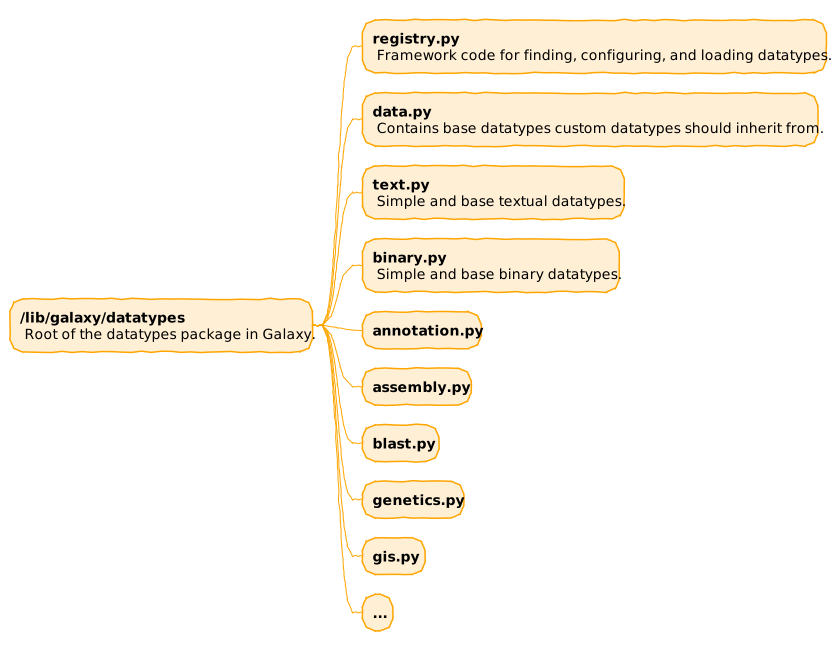 Developer docs on adding new datatypes can be found at https://docs.galaxyproject.org/en/latest/dev/data_types.html. --- class: center ### Tools 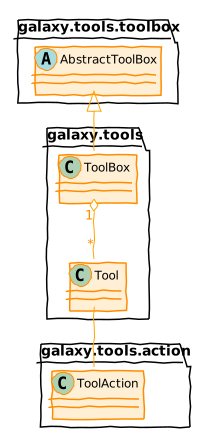 Three major classes can be summarized as - the `ToolBox` contains `Tool` objects that execute a `ToolAction`. --- class: center ### Subclasses of Tool 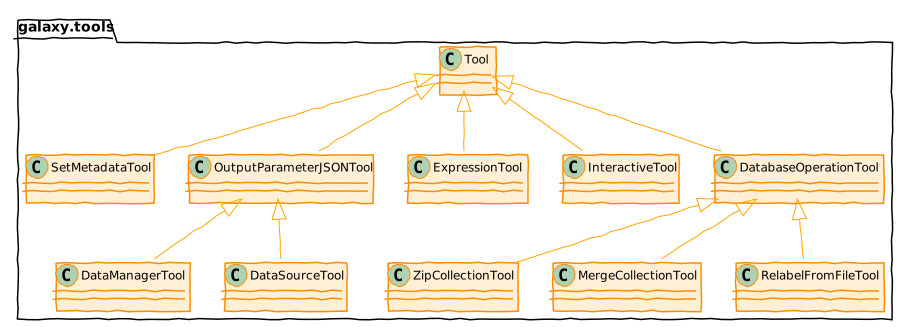 --- class: center 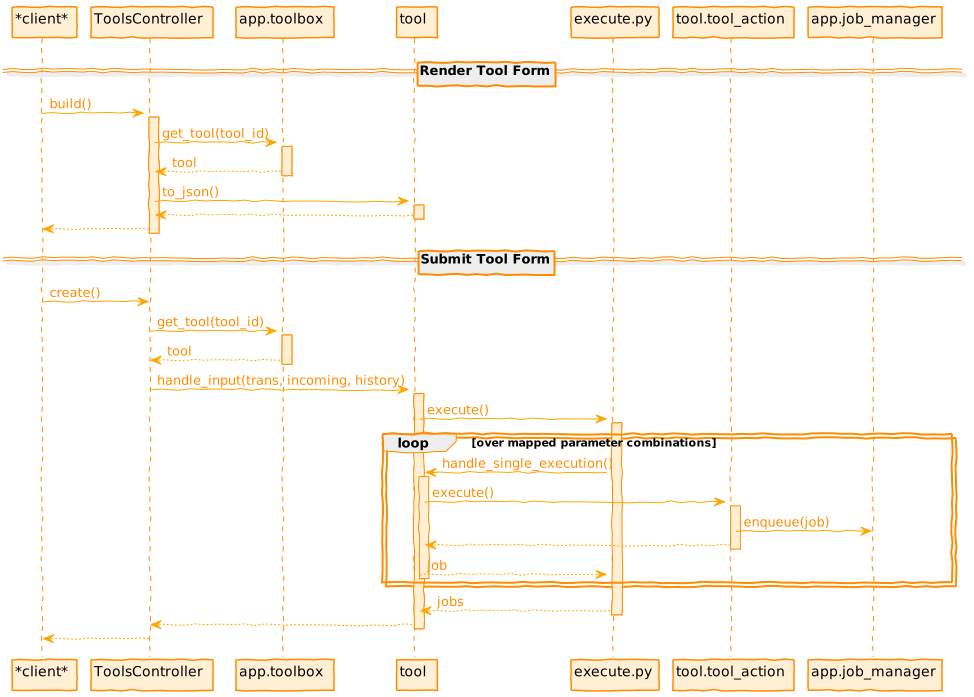 --- ### A Little About Jobs - Job is placed into the database and picked up by the job handler. - Job handler (`JobHandler`) watches the job and transitions job's state - common startup and finishing. - Job mapper (`JobRunnerMapper`) decides the "destination" for a job. - Job runner (e.g. `DrammaJobRunner`) actual runs the job and provides an interface for checking status. --- class: center ### Job Runners 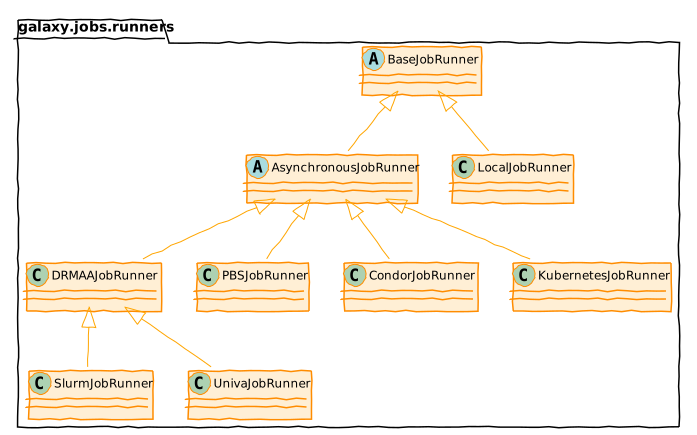 --- class: center 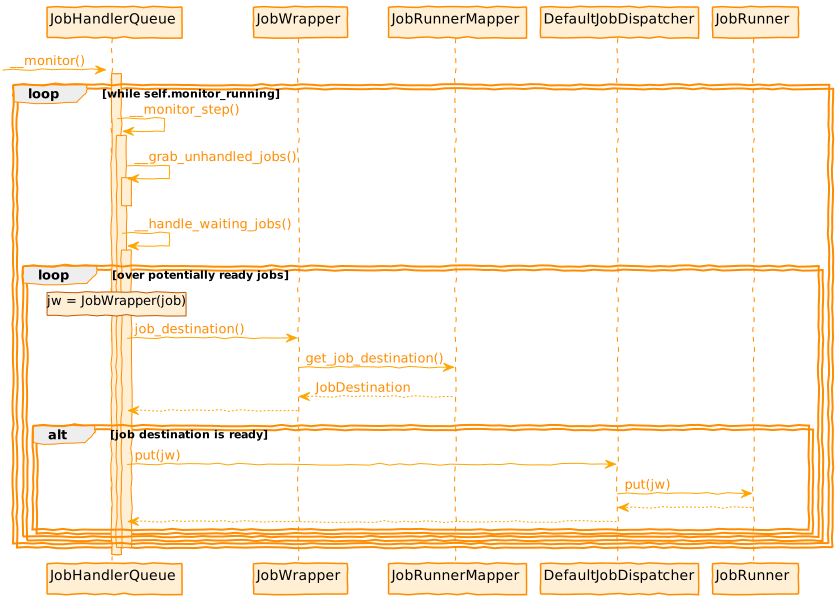 --- class: center 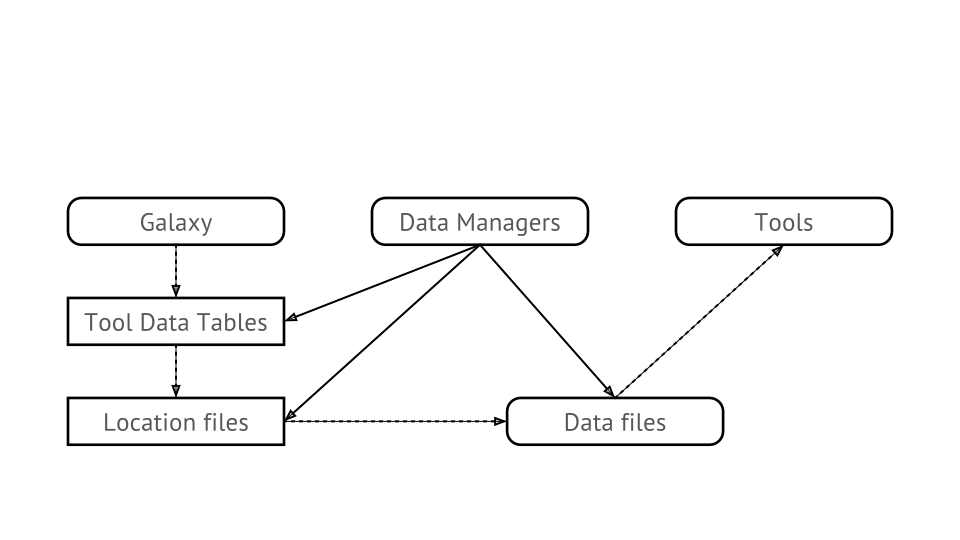 --- ### Visualization Plugins Adding new visualizations to a Galaxy instance - Configuration file (XML) - Base template (Mako or JavaScript) - Additional static data if needed (CSS, JS, …) .footnote[[Learn more about it with our visualization tutorial.](/training-material/topics/dev/tutorials/visualization-generic/slides.html)] --- class: reduce70 ```xml <?xml version="1.0" encoding="UTF-8"?> <!DOCTYPE visualization SYSTEM "../../visualization.dtd"> <visualization name="ChiRAViz"> <description>ChiRAViz</description> <data_sources> <data_source> <model_class>HistoryDatasetAssociation</model_class> <test type="isinstance" test_attr="datatype" result_type="datatype">binary.ChiraSQLite</test> <to_param param_attr="id">dataset_id</to_param> </data_source> </data_sources> <params> <param type="dataset" var_name_in_template="hda" required="true">dataset_id</param> </params> <template>chiraviz.mako</template> </visualization> ``` --- ### Visualization Examples All in `config/plugins/visualizations`: - `chiraviz` - Latest addition mid-2020, demonstrates current state of the art building and packing. [#9562](https://github.com/galaxyproject/galaxy/pull/9562) - `csg` - Chemical structure viewer - `graphviz` - Visualize graph data using [cytoscape.js](http://www.cytoscape.org/) - `charts` - Classic charts as well as some integrated BioJS visualizations - `trackster` - Genome browser, deeply tied to Galaxy internals. --- ### Data Providers Provide efficient access to data for viz & API Framework provides direct link to read the raw dataset or use data providers to adapt it In config, assert that visualization requires a given type of data providers Data providers process data before sending to browser - slice, filter, reformat, ... --- ### Object Store .strike[```python >>> fh = open(dataset.file_path, 'w') >>> fh.write('foo') >>> fh.close() >>> fh = open(dataset.file_path, 'r') >>> fh.read() ```] ```python >>> app.objectstore.update_from_file(dataset, file_name='foo.txt') >>> app.objectstore.get_data(dataset) >>> app.objectstore.get_data(dataset, start=42, count=4096) ``` --- class: center 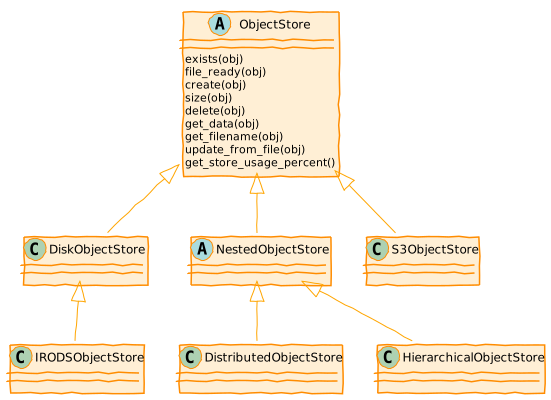 These implementation are found below `lib/galaxy/objectstore/`. --- class: center 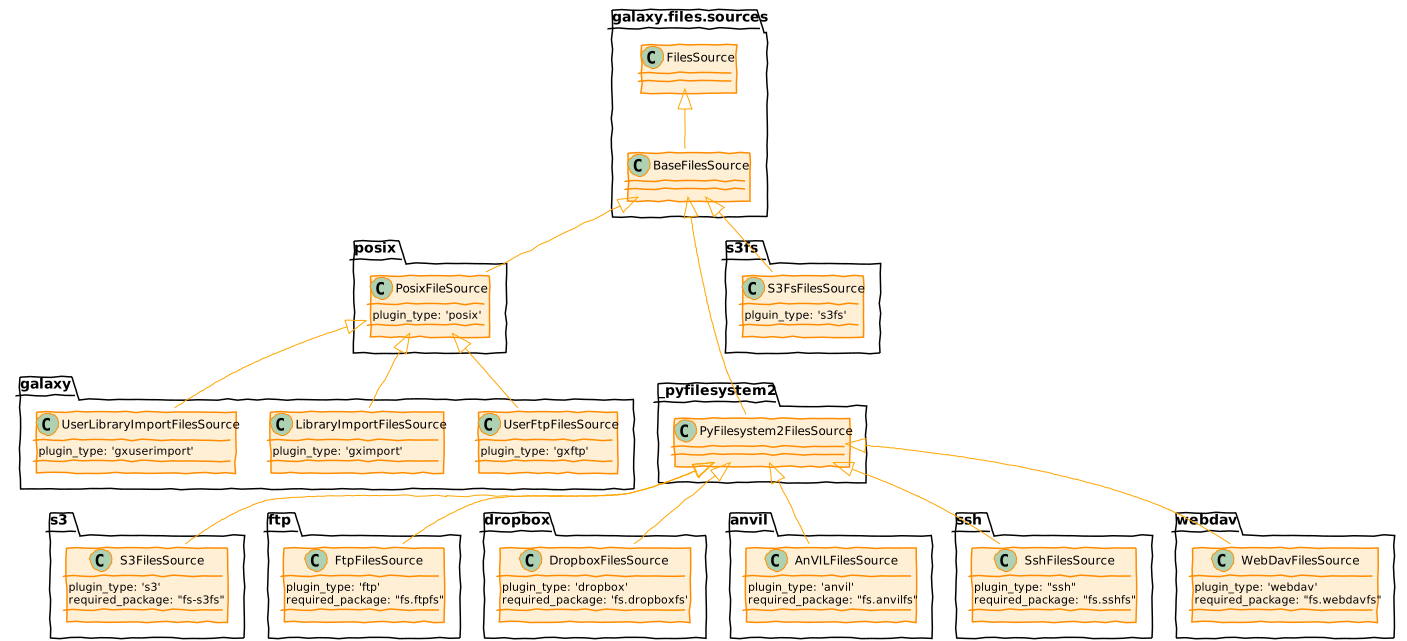 --- ### FileSources vs ObjectStores ObjectStores provide datasets not files, the files are organized logically in a very flat way around a dataset. FilesSources instead provide files and directories, not datasets. A FilesSource is meant to be browsed in hierarchical fashion - and also has no concept of extra files, etc.. The former is assumed to be persistent, the latter makes no such assumption. --- More information about File source plugins can be found at http://bit.ly/gcc21files --- class: center ### Workflow Modules 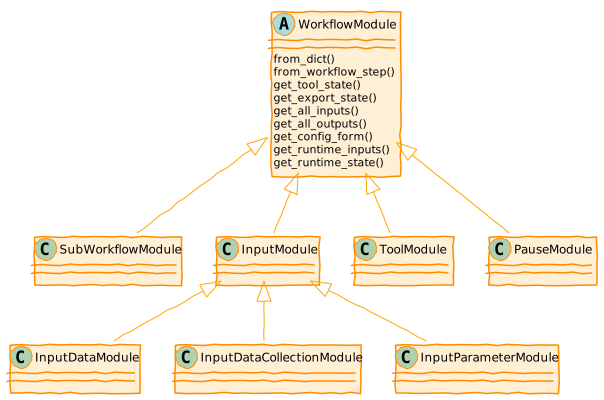 All these modules are found in `lib/galaxy/workflow/modules.py`. --- ### `lib/galaxy/util/plugin_config.py` Standardized way to load both a set of possible plugin class implementations from a directory of Python files and to parse either an XML or YAML/JSON description of configured plugins. --- ### `lib/galaxy/util/plugin_config.py` Example Files  --- ### `lib/galaxy/util/plugin_config.py` Plugin Implementations ```python def plugins_dict(module, plugin_type_identifier): plugin_dict = {} for plugin_module in import_submodules(module, ordered=True): for clazz in __plugin_classes_in_module(plugin_module): plugin_type = getattr(clazz, plugin_type_identifier, None) if plugin_type: plugin_dict[plugin_type] = clazz return plugin_dict ``` --- class: reduce70 ### Pieces of `lib/galaxy/tool_util/deps/containers.py` ```python class ContainerRegistry(object): def __init__(self, app_info, mulled_resolution_cache=None): self.resolver_classes = self.__resolvers_dict() self.app_info = app_info self.container_resolvers = self.__build_container_resolvers(app_info) # ... other stuff here def __build_container_resolvers(self, app_info): conf_file = getattr(app_info, 'containers_resolvers_config_file', None) plugin_source = plugin_config.plugin_source_from_path(conf_file) return self._parse_resolver_conf(plugin_source) def _parse_resolver_conf(self, plugin_source): extra_kwds = { 'app_info': self.app_info } return plugin_config.load_plugins( self.resolver_classes, plugin_source, extra_kwds ) def __resolvers_dict(self): import galaxy.tool_util.deps.container_resolvers return plugin_config.plugins_dict( galaxy.tool_util.deps.container_resolvers, 'resolver_type' ) ``` --- ### Pieces of `lib/galaxy/tool_util/deps/container_resolvers/mulled.py` ```python class CachedMulledDockerContainerResolver(ContainerResolver): resolver_type = "cached_mulled" def __init__(self, app_info=None, namespace="biocontainers", hash_func="v2", **kwds): super(CachedMulledDockerContainerResolver, self).__init__(app_info) self.namespace = namespace self.hash_func = hash_func def resolve(self, enabled_container_types, tool_info, **kwds): # ... do the magic with configured plugin ``` --- `container_resolvers_conf.xml` ```xml <container_resolvers> <cached_mulled /> <cached_mulled namespace="mycustom" /> </container_resolvers> ``` `container_resolvers_conf.yml` ```yaml - resolver_type: cached_mulled - resolver_type: cached_mulled namespace: mycustom ``` .footnote[Previous: [Galaxy Application Components: Models, Managers, and Services](/training-material/topics/dev/tutorials/architecture-application-components/slides.html) | Next: [Galaxy File Sources Architecture](/training-material/topics/dev/tutorials/architecture-file-sources/slides.html)] --- ### <i class="fas fa-key" aria-hidden="true"></i><span class="visually-hidden">keypoints</span> Key points - Nearly everything in Galaxy is a plugin - `plugin_config.py` provides standardized loading - Datatypes, tools, job runners, object stores are all pluggable - Visualization and workflow modules extend functionality --- ## Thank You! This material is the result of a collaborative work. Thanks to the [Galaxy Training Network](https://training.galaxyproject.org) and all the contributors! <div markdown="0"> <div class="contributors-line"> <a href="/training-material/hall-of-fame/jmchilton/" class="contributor-badge contributor-jmchilton"><img src="/training-material/assets/images/orcid.png" alt="orcid logo" width="36" height="36"/><img src="https://avatars.githubusercontent.com/jmchilton?s=36" alt="John Chilton avatar" width="36" class="avatar" /> John Chilton</a> </div> </div> <div style="display: flex;flex-direction: row;align-items: center;justify-content: center;"> <img src="/training-material/assets/images/GTNLogo1000.png" alt="Galaxy Training Network" style="height: 100px;"/> </div> Tutorial Content is licensed under <a rel="license" href="http://creativecommons.org/licenses/by/4.0/">Creative Commons Attribution 4.0 International License</a>.<br/>