name: inverse layout: true class: center, middle, inverse <div class="my-header"><span> <a href="/training-material/topics/dev" title="Return to topic page" ><i class="fa fa-level-up" aria-hidden="true"></i></a> <a href="https://github.com/galaxyproject/training-material/edit/main/topics/dev/tutorials/architecture-file-sources/slides.html"><i class="fa fa-pencil" aria-hidden="true"></i></a> </span></div> <div class="my-footer"><span> <img src="/training-material/assets/images/GTN-60px.png" alt="Galaxy Training Network" style="height: 40px;"/> </span></div> --- <img src="/training-material/assets/images/GTNLogo1000.png" alt="Galaxy Training Network" class="cover-logo"/> <br/> <br/> # Architecture 10 - Galaxy File Sources Architecture <br/> <br/> <div markdown="0"> <div class="contributors-line"> <a href="/training-material/hall-of-fame/jmchilton/" class="contributor-badge contributor-jmchilton"><img src="/training-material/assets/images/orcid.png" alt="orcid logo" width="36" height="36"/><img src="https://avatars.githubusercontent.com/jmchilton?s=36" alt="John Chilton avatar" width="36" class="avatar" /> John Chilton</a><a href="/training-material/hall-of-fame/davelopez/" class="contributor-badge contributor-davelopez"><img src="https://avatars.githubusercontent.com/davelopez?s=36" alt="David López avatar" width="36" class="avatar" /> David López</a> </div> </div> <!-- modified date --> <div class="footnote" style="bottom: 8em;"> <i class="far fa-calendar" aria-hidden="true"></i><span class="visually-hidden">last_modification</span> Updated: <i class="fas fa-fingerprint" aria-hidden="true"></i><span class="visually-hidden">purl</span><abbr title="Persistent URL">PURL</abbr>: <a href="https://gxy.io/GTN:S00146">gxy.io/GTN:S00146</a> </div> <!-- other slide formats (video and plain-text) --> <div class="footnote" style="bottom: 5em;"> <i class="fas fa-file-alt" aria-hidden="true"></i><span class="visually-hidden">text-document</span><a href="slides-plain.html"> Plain-text slides</a> | </div> <!-- usage tips --> <div class="footnote" style="bottom: 2em;"> <strong>Tip: </strong>press <kbd>P</kbd> to view the presenter notes | <i class="fa fa-arrows" aria-hidden="true"></i><span class="visually-hidden">arrow-keys</span> Use arrow keys to move between slides </div> ??? Presenter notes contain extra information which might be useful if you intend to use these slides for teaching. Press `P` again to switch presenter notes off Press `C` to create a new window where the same presentation will be displayed. This window is linked to the main window. Changing slides on one will cause the slide to change on the other. Useful when presenting. --- ### <i class="far fa-question-circle" aria-hidden="true"></i><span class="visually-hidden">question</span> Questions - What are File Sources in Galaxy? - How do user-defined file sources work? - What is the difference between File Sources and Object Stores? --- ### <i class="fas fa-bullseye" aria-hidden="true"></i><span class="visually-hidden">objectives</span> Objectives - Understand the File Sources plugin architecture - Learn about user-defined file source templates - Understand fsspec and PyFilesystem2 base classes - Learn about OAuth integration for cloud services --- layout: introduction_slides topic_name: Galaxy Architecture # Architecture 10 - Galaxy File Sources Architecture *The architecture of pluggable file sources in Galaxy.* --- layout: true name: left-aligned class: left, middle --- layout: true class: center, middle --- ### The Problem & Solution **Problem** - Galaxy needs to read and write files from diverse sources - Before file sources, each backend required core code changes and there was no extensibility for new storage types **Plugin Architecture** - `FilesSource` interface for all backends - `BaseFilesSource` reference implementation - `ConfiguredFileSources` orchestrates plugins (`lib/galaxy/files/__init__.py`) - `FileSourcePluginLoader` discovers plugins (`lib/galaxy/files/plugins.py`) **Applications** - Upload dialog, rule builder, collection creation, etc. - History & workflow import/export. - Directory tools. --- class: reduce70 ### Core Abstractions 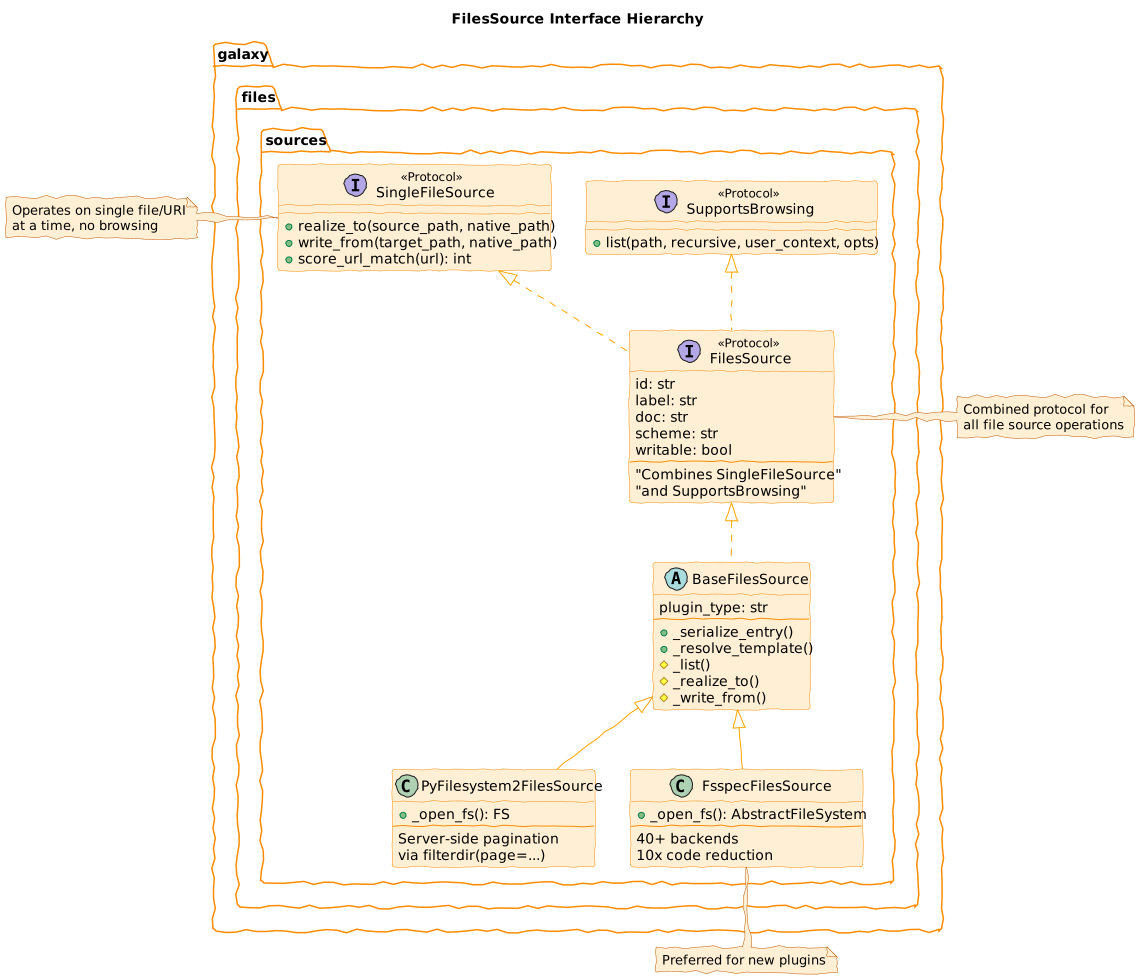 **Three interfaces:** `SingleFileSource`, `SupportsBrowsing`, `FilesSource` --- class: reduce70 ### URI Routing & Plugin Scoring 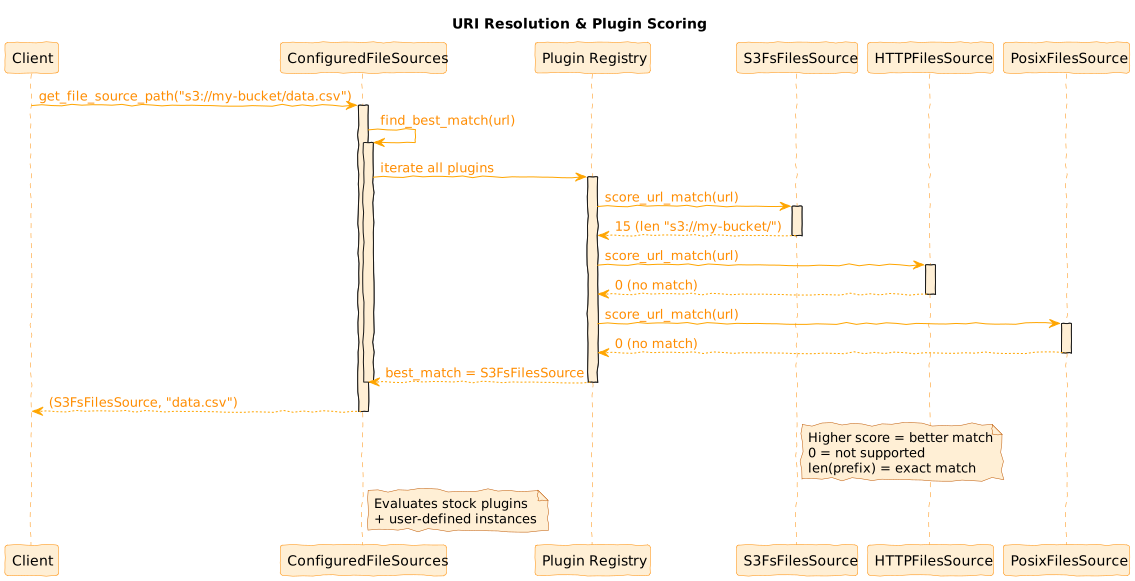 --- class: reduce70 left-aligned ### URI Scoring Example: S3 FilesSource ```python def score_url_match(self, url: str) -> int: if url.startswith("s3://"): bucket_name = self._get_config_bucket() if bucket_name: prefix = f"s3://{bucket_name}/" if url.startswith(prefix): return len(prefix) # Exact bucket match # Prevent s3://my-bucket-prod matching s3://my-bucket elif url.startswith(f"s3://{bucket_name}") and url[len(f"s3://{bucket_name}")] != "/": return 0 # Boundary check failed return 1 # Generic S3 match return 0 ``` **Scoring algorithm:** Returns 0 (unsupported) to URI length (exact match) --- class: reduce70 ### User Context & Access Control 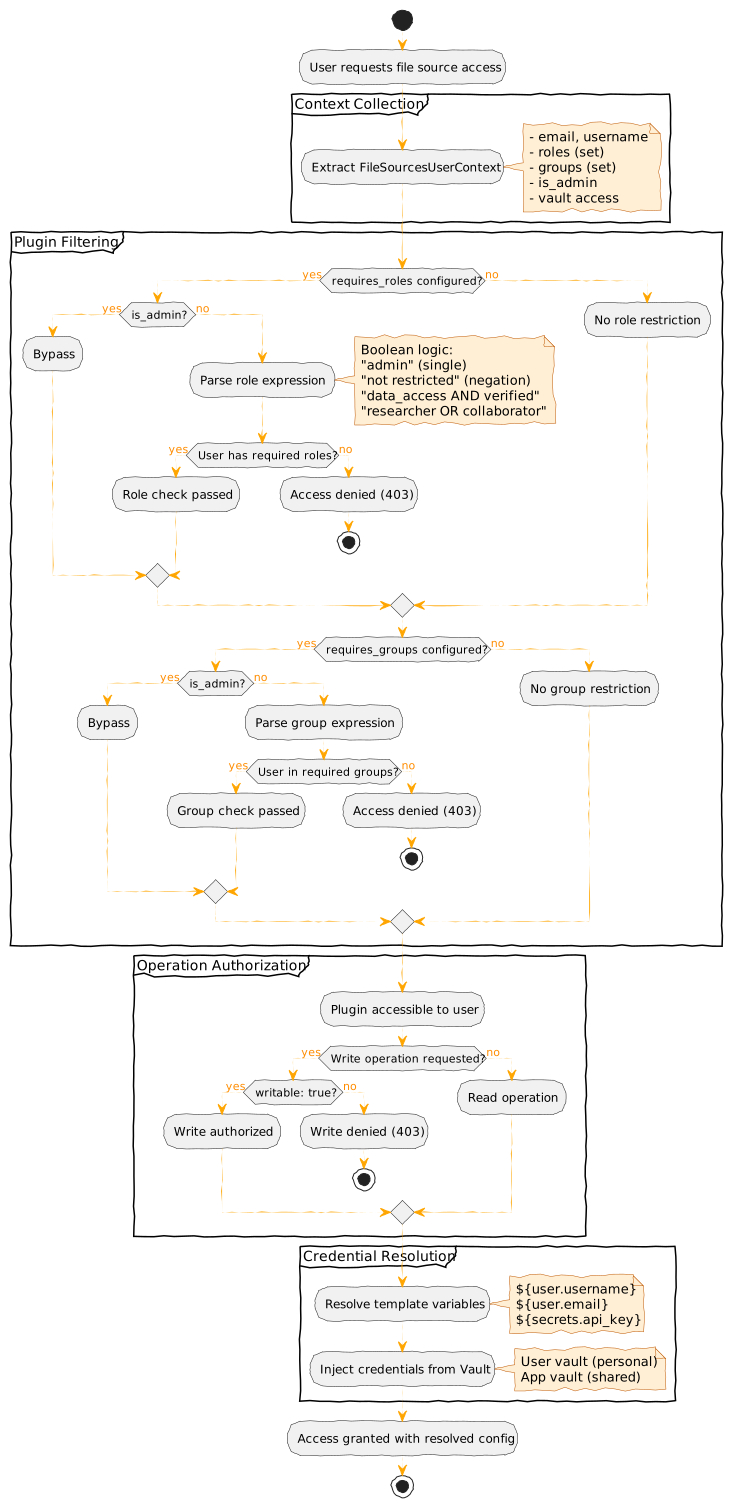 --- class: reduce90 ### Access Control Configuration ```yaml # Role-based access control - type: s3fs id: restricted_bucket label: Restricted Project Data bucket: sensitive-data requires_roles: "data_access" requires_groups: "engineering OR research" # Vault credential injection - type: posix id: user_staging root: /data/staging/${user.username} writable: true ``` --- class: reduce90 left-aligned ### PyFilesystem2 Foundation **Older abstraction:** PyFilesystem2 (fs) library for FTP, WebDAV, cloud SDKs - **Server-side pagination** via `filterdir(page=(start, end))` - **Context manager** pattern (filesystems opened/closed per operation) - Use cases: FTP, WebDAV, SSH protocols ```python class PyFilesystem2FilesSource(BaseFilesSource): def _list(self, path="/", recursive=False, user_context=None, opts=None): with self._open_fs(user_context) as fs: limit = opts.limit if opts else None offset = opts.offset if opts else 0 # Server-side pagination for large directories if limit is not None: page = (offset, offset + limit) entries = list(fs.filterdir(path, page=page)) else: entries = list(fs.scandir(path)) return self._serialize_entries(entries), len(entries) ``` --- class: reduce70 ### fsspec 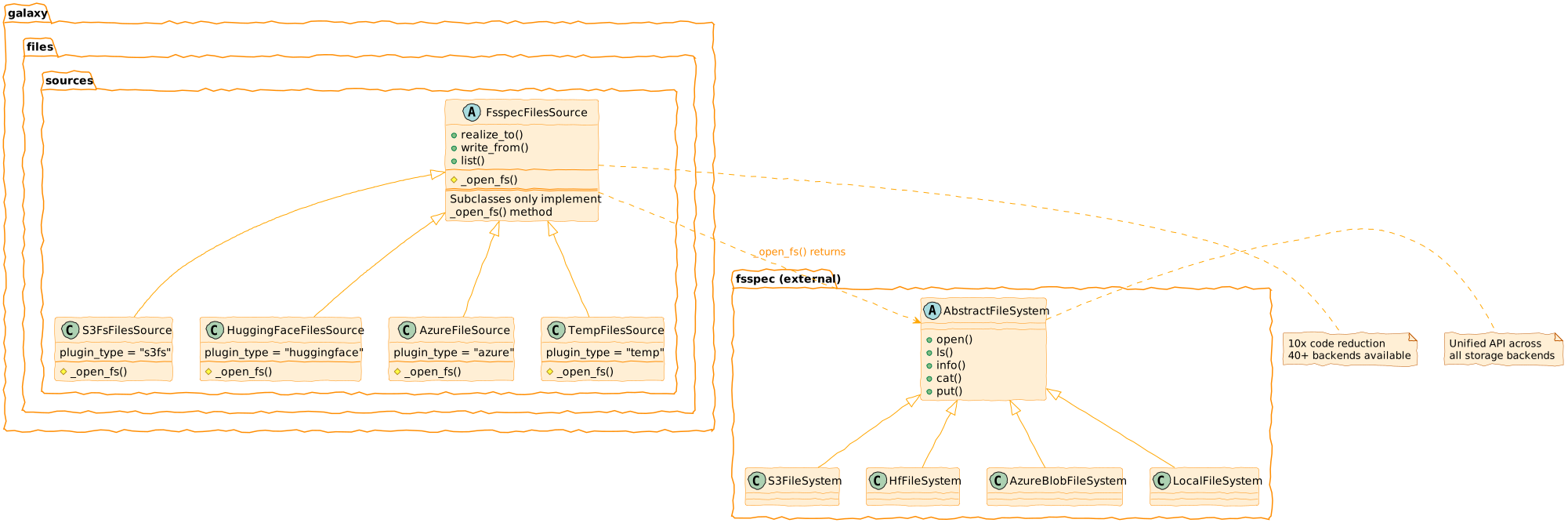 --- class: reduce70 ### fsspec Plugin Simplicity **Plugin authors implement only `_open_fs()`** - base class handles the rest ```python class S3FsFilesSource(FsspecFilesSource): """S3-compatible storage via fsspec.""" plugin_type = "s3fs" def _open_fs(self, user_context=None): config = self._get_config(user_context) return fsspec.filesystem( "s3", anon=config.anon, key=config.access_key_id, secret=config.secret_access_key, client_kwargs={"endpoint_url": config.endpoint_url}, ) ``` Base class provides: `realize_to`, `write_from`, `list` (with pagination), `score_url_match` --- class: enlarge120 left-aligned ### PyFilesystem2 vs fsspec | Feature | PyFilesystem2 | fsspec | |---------|---------------|--------| | **External Backends** | ~20 | 40+ (Zarr, Git, HF, etc.) | | **Galaxy Plugins** | 12 (FTP, WebDAV, Dropbox, Drive, GCS...) | 6 (S3, Azure flat, HF) | | **Pagination** | Native server-side `filterdir(page=...)` | Client-side after full listing | | **Ecosystem** | 7M downloads/mo | 543M downloads/mo | fsspec born from [Dask](https://www.dask.org/), used by pandas, xarray, zarr, PyArrow, HF Datasets *Downloads: [pypistats.org](https://pypistats.org/), Dec 2025* --- class: reduce70 ### Adding a Plugin: The Pattern 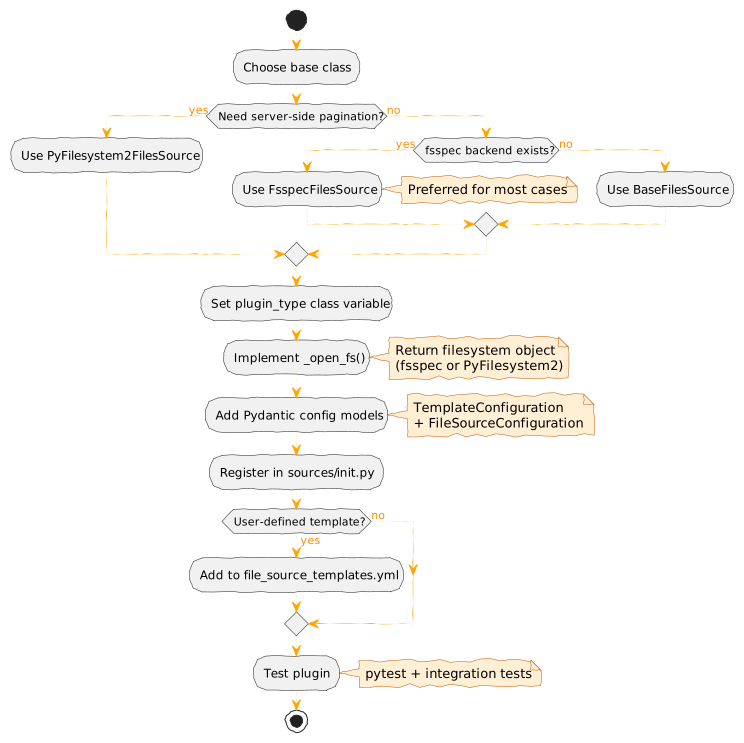 **Key insight:** `FsspecFilesSource` handles file operations—you implement only `_open_fs()` --- class: left-aligned ### Adding a Plugin: Steps **Create one file:** `lib/galaxy/files/sources/mycloud.py` 1. Define Pydantic config models (template + resolved) 2. Create plugin class with `plugin_type` (enables auto-discovery) 3. Implement `_open_fs()` returning fsspec filesystem 4. Register configs in `lib/galaxy/files/templates/models.py` type unions 5. Add documentation to `doc/source/admin/data.md` --- class: reduce70 ### Adding a Plugin: Example ```python # Pydantic models: template allows Jinja2, resolved requires concrete values class MyCloudTemplateConfig(FsspecBaseFileSourceTemplateConfiguration): token: Union[str, TemplateExpansion, None] = None endpoint: Union[str, TemplateExpansion, None] = None class MyCloudConfig(FsspecBaseFileSourceConfiguration): token: Optional[str] = None endpoint: Optional[str] = None # Plugin class: only _open_fs() required class MyCloudFilesSource(FsspecFilesSource[MyCloudTemplateConfig, MyCloudConfig]): plugin_type = "mycloud" # Auto-discovery key required_module = MyCloudFS # Optional: lazy import check required_package = "mycloud-fsspec" # Optional: helpful error message template_config_class = MyCloudTemplateConfig resolved_config_class = MyCloudConfig def _open_fs(self, context, cache_options): config = context.config return fsspec.filesystem("mycloud", token=config.token) ``` --- class: reduce90 ### Stock Plugins: Built-in Sources 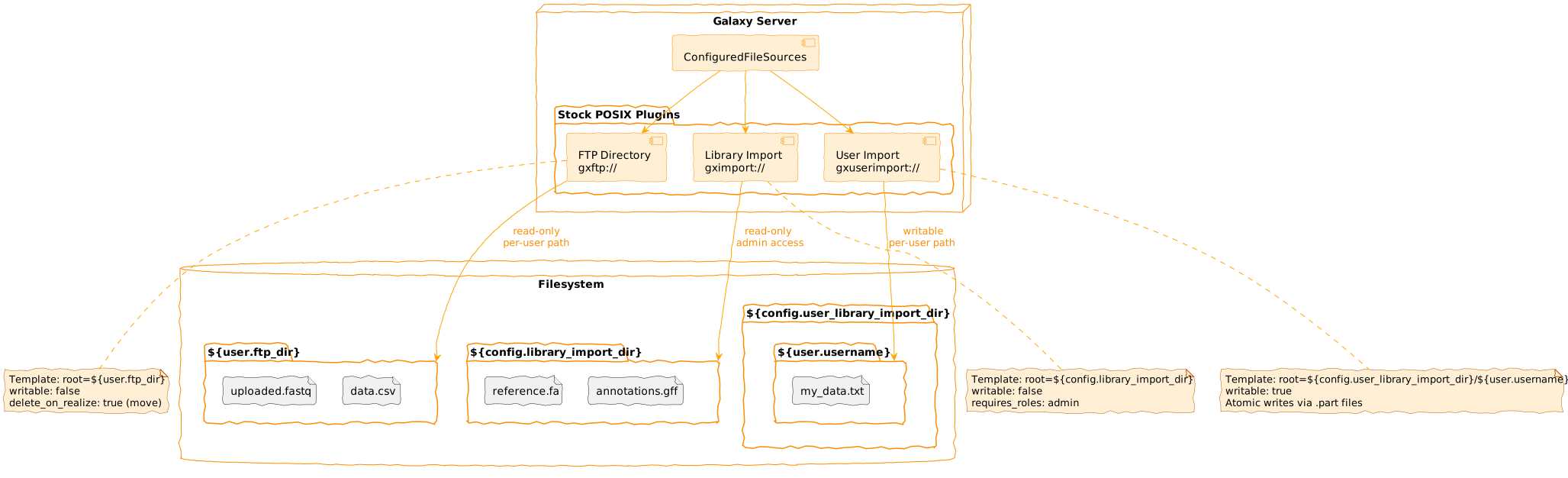 Three sources in `lib/galaxy/files/sources/galaxy.py` extend `PosixFilesSource`: | Class | Scheme | Root Template | |-------|--------|---------------| | `UserFtpFilesSource` | `gxftp://` | `${user.ftp_dir}` | | `LibraryImportFilesSource` | `gximport://` | `${config.library_import_dir}` | | `UserLibraryImportFilesSource` | `gxuserimport://` | `${config.user_library_import_dir}/${user.email}` | --- ### POSIX Security & Behaviors **Symlink Protection** (`lib/galaxy/files/sources/posix.py`) ```python if config.enforce_symlink_security: if not safe_contains(effective_root, source_native_path, allowlist=self._allowlist): raise Exception("Operation not allowed.") ``` `safe_contains` in `util/path/__init__.py` validates against `symlink_allowlist` **Atomic Writes** (`lib/galaxy/files/sources/posix.py`) ```python target_native_path_part = os.path.join(parent, f"_{name}.part") shutil.copyfile(native_path, target_native_path_part) os.rename(target_native_path_part, target_native_path) ``` **Move vs Copy**: `delete_on_realize` config—FTP defaults to `ftp_upload_purge` (frees quota) --- class: enlarge150 ### User-Driven Storage **Global Storage:** Admin configures all sources globally in `file_sources_conf.yml` for all users **Problem:** Doesn't scale—diverse user needs (buckets, projects, credentials) **Solution:** Template catalog + user instances - Admin provides templates - Users instantiate with their credentials - Allows multiple instances per template --- class: reduce70 left-aligned ### Template Catalog Structure ```yaml # file_source_templates.yml (admin-configured) - id: s3_template name: AWS S3 Bucket description: Connect to your AWS S3 bucket version: 1 variables: bucket: label: Bucket Name type: string region: label: AWS Region type: string default: us-east-1 secrets: access_key_id: label: Access Key ID secret_access_key: label: Secret Access Key configuration: type: s3fs bucket: "" access_key_id: "" ``` --- class: center ### Template System: Pydantic Models 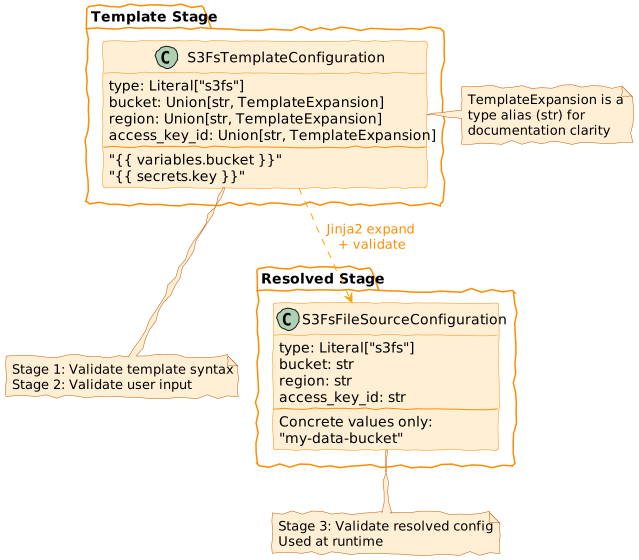 --- class: reduce90 left-aligned ### Two-Tier Configuration ```python # Template-stage: allows Jinja2 expressions class S3FsTemplateConfiguration(BaseModel): type: Literal["s3fs"] bucket: Union[str, TemplateExpansion] # "" access_key_id: Union[str, TemplateExpansion] # Resolved-stage: concrete values only class S3FsFilesSourceConfiguration(BaseModel): type: Literal["s3fs"] bucket: str # Must be concrete string access_key_id: str ``` **Three-stage validation:** Template syntax → User input → Resolved config --- class: center ### Template Expansion: Jinja2 Resolution 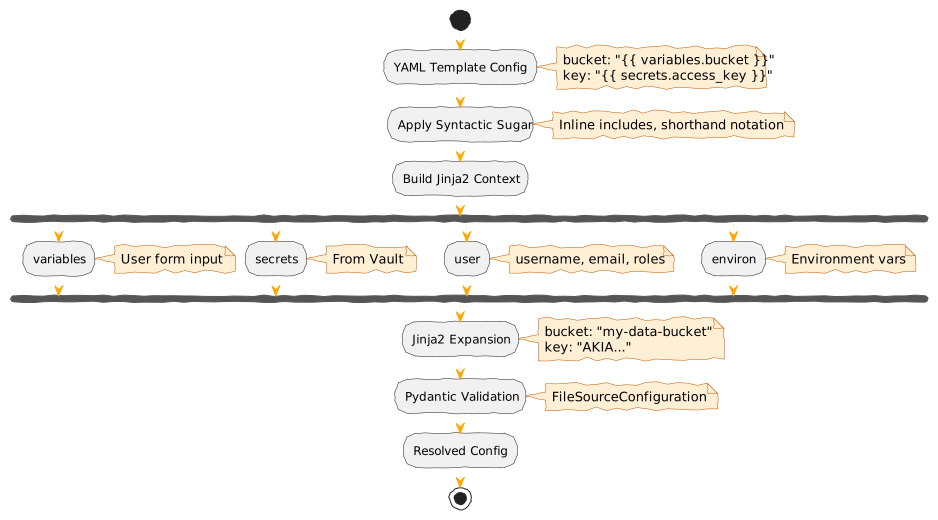 --- class: reduce90 left-aligned ### Jinja2 Contexts Four available contexts for variable resolution: ```python context = { "variables": variables, # User form input "secrets": secrets, # From Vault "user": user, # Galaxy user (username, email, roles) "environ": os.environ, # Environment vars } expanded = jinja_env.expand(template.model_dump(), context) ``` **Custom filters:** `ensure_path_component`, `asbool` --- class: center ### User Instance Lifecycle  --- class: enlarge120 ### Instance CRUD Operations **Persistence:** `user_file_source` table + Vault **Validation workflow:** 1. Payload schema validation against template 2. Template variable/secret validation 3. Connection testing (root-level listing) 4. Persist to database + Vault **Security:** Ownership validation, user-bound isolation --- class: reduce90 left-aligned ### OAuth 2.0 Integration Pattern **Authorization flow:** 1. User clicks "Authorize" → Galaxy generates auth URL + pre-generates UUID 2. Redirect to provider (Dropbox, Google) → User grants permissions 3. Provider callback with code → Galaxy exchanges for tokens 4. Tokens stored in Vault → Instance created ```yaml # Dropbox OAuth template - id: dropbox_oauth name: Dropbox secrets: client_id: ... client_secret: ... configuration: type: dropbox access_token: "" refresh_token: "" ``` --- class: center ### OAuth 2.0 Authorization Flow  --- class: enlarge120 ### URL Unification **Before PR #15497:** Separate code paths - HTTP/FTP: Custom URL handler - S3: Separate S3 handler - DRS: Separate DRS handler - File sources: `gxfiles://` only **After:** All URLs routed through file sources - Unified authentication - `url_regex` for site-specific handlers - `http_headers` for Bearer tokens, Basic Auth --- class: reduce70 ### URL Routing with Credentials ```yaml # Site-specific URL routing with auth - type: http id: internal_api label: Internal Data API url_regex: "^https://api\\.internal\\.org/" http_headers: Authorization: "Bearer ${secrets.api_token}" - type: http id: public_http label: Public HTTP url_regex: "^https?://.*" # No auth - public access ``` URLs automatically route to correct handler based on scoring --- class: center ### API Integration  --- class: enlarge120 ### API Endpoints **Remote Files API (browsing):** - `GET /api/remote_files` - Directory listing with pagination - `GET /api/remote_files/plugins` - Plugin enumeration - `POST /api/remote_files` - Entry creation (writable sources) **File Sources API (templates/instances):** - `GET /api/file_source_templates` - Template catalog - `POST /api/file_source_instances` - Create instance - `GET /api/file_source_instances` - List user instances - `PUT/DELETE /api/file_source_instances/{uuid}` - Update/delete --- class: center ### Evolution Timeline  .footnote[Previous: [Galaxy Plugin Architecture](/training-material/topics/dev/tutorials/architecture-plugins/slides.html) | Next: [Galaxy Markdown Architecture](/training-material/topics/dev/tutorials/architecture-markdown/slides.html)] --- ### <i class="fas fa-key" aria-hidden="true"></i><span class="visually-hidden">keypoints</span> Key points - File Sources provide hierarchical file access for import/export - User-defined templates enable personal cloud storage connections - fsspec enables easy integration of 40+ storage backends - OAuth 2.0 supports seamless cloud service authentication --- ## Thank You! This material is the result of a collaborative work. Thanks to the [Galaxy Training Network](https://training.galaxyproject.org) and all the contributors! <div markdown="0"> <div class="contributors-line"> <a href="/training-material/hall-of-fame/jmchilton/" class="contributor-badge contributor-jmchilton"><img src="/training-material/assets/images/orcid.png" alt="orcid logo" width="36" height="36"/><img src="https://avatars.githubusercontent.com/jmchilton?s=36" alt="John Chilton avatar" width="36" class="avatar" /> John Chilton</a><a href="/training-material/hall-of-fame/davelopez/" class="contributor-badge contributor-davelopez"><img src="https://avatars.githubusercontent.com/davelopez?s=36" alt="David López avatar" width="36" class="avatar" /> David López</a> </div> </div> <div style="display: flex;flex-direction: row;align-items: center;justify-content: center;"> <img src="/training-material/assets/images/GTNLogo1000.png" alt="Galaxy Training Network" style="height: 100px;"/> </div> Tutorial Content is licensed under <a rel="license" href="http://creativecommons.org/licenses/by/4.0/">Creative Commons Attribution 4.0 International License</a>.<br/>